Giving people an AI tool is the easy part. Classroom teaches them to use it well — practical skills, safe habits, and examples from real work. Not a slide deck everyone forgets by Friday.
Recommended courses and live sessions, with progress saved as people go.
Why training is the difference
Tools don’t change how people work. Practice does.
Most AI rollouts stall in the same place: licenses go out, a few people get curious, and everyone else keeps working the old way. Classroom closes that gap.
Built for people, not prompts
Short videos, guided practice, and quick knowledge checks. People learn a skill in minutes and use it the same day — no prompt-engineering degree required.
Safe use is part of the curriculum
Your AI policy, protecting sensitive information, reviewing what AI produces, and keeping a person accountable for the result. Safety is taught, not assumed.
Tied to the work
Learning paths map to Station52 Workspace agents and the tasks your teams already do — so the next step after a lesson is real work, not another lesson.
What’s inside
A real learning platform, not a folder of recordings
Everything people need to learn, practice, and keep going — in one place they can come back to.
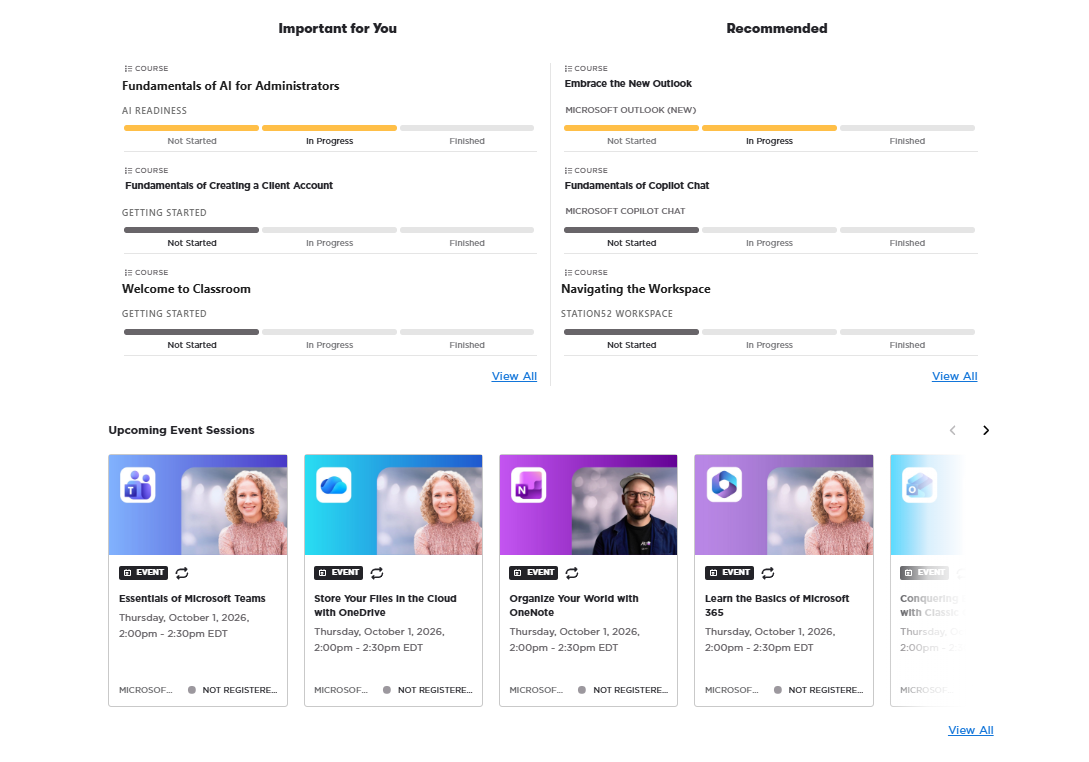
Learning home
A learning home for every employee
Each person gets a personalized list of the courses that are important for them and what’s recommended next. Progress moves from Not started to In progress to Finished, so nobody has to guess where they left off.
Personalized “Important for you” and “Recommended” lists
Not started → In progress → Finished on every course
Upcoming 30-minute live sessions, ready to register
Assigned and recommended courses, with progress, beside upcoming live sessions.
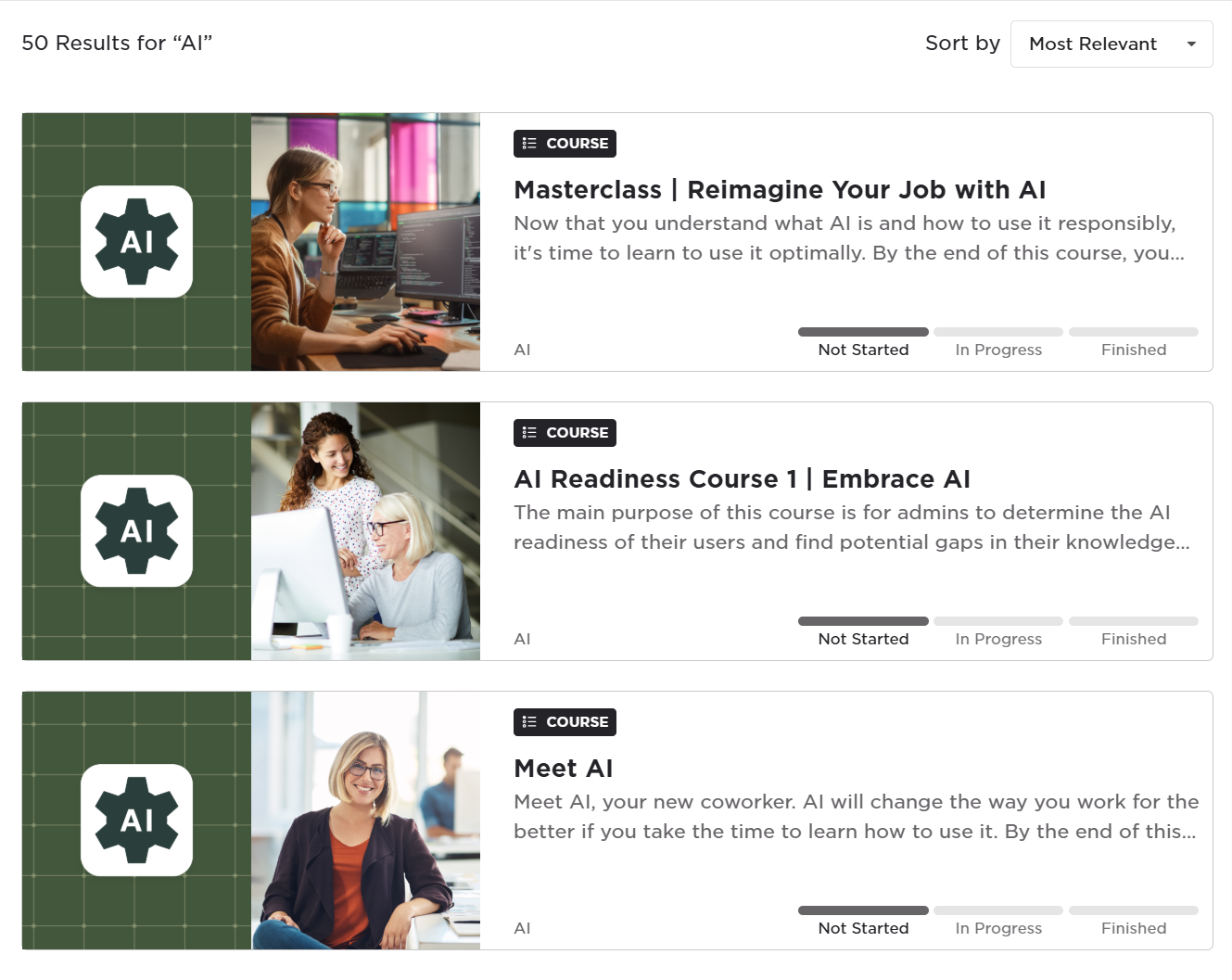
Catalog
A catalog you can search by role, tool, or topic
Search for what you need right now. Start with Meet AI, check your team’s readiness, or take the masterclass on reimagining your own job with AI once the basics are in place.
Meet AI: what it is and what it isn’t
AI readiness — find the gaps before you roll out
Masterclass — reimagine your job with AI
Search the catalog and see your progress on every result.
Courses
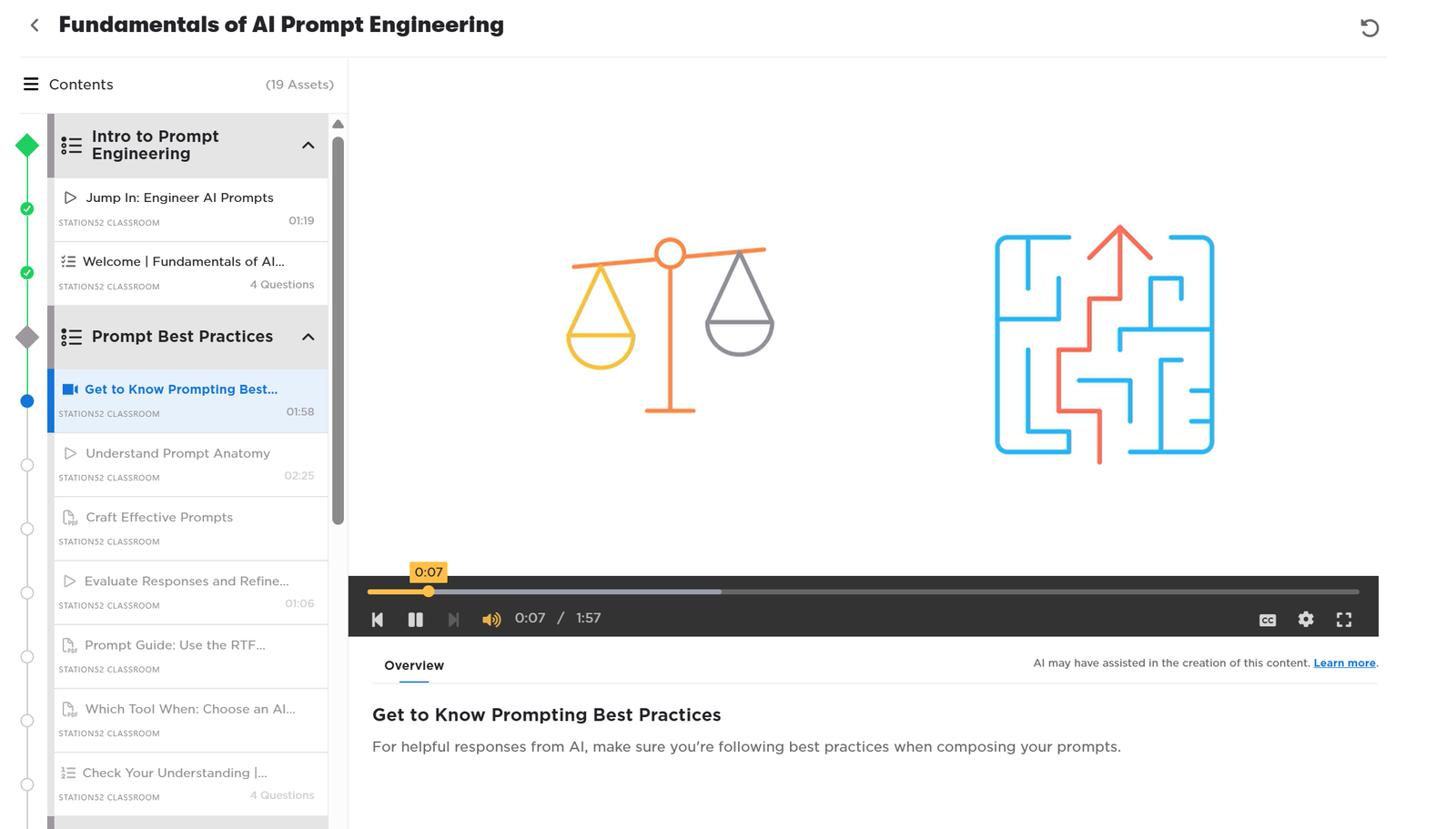
Courses built from short lessons
Fundamentals of AI Prompt Engineering runs across 19 assets: one- to three-minute videos, PDF guides, and knowledge checks. People can learn a skill between meetings and pick up exactly where they stopped.
1–3 minute videos with closed captions
Downloadable PDF guides and quick references
Knowledge checks at the end of each section
Progress tracked lesson by lesson
Short videos, PDFs, and quizzes, with progress tracked lesson by lesson.
Learning paths
A path for everyone, from first login to team champion
Start everyone on the same foundations, then branch by role. Self-paced paths fit around the workday; live sessions add a person to ask.
Self-paced
AI foundations
For everyone
What AI is, what it’s good at, and how to use it responsibly at work.
Meet AI
Responsible use
Your company’s AI policy
Protecting sensitive information
Self-paced
Prompting fundamentals
For everyone
How to ask clearly, give context, and check what comes back before you use it.
Prompt anatomy
Best practices
Evaluating and refining responses
Choosing the right tool
Live
Microsoft 365 & Copilot essentials
For everyone
Scheduled 30-minute sessions on the tools your team already opens every day.
Essentials of Microsoft Teams
Store your files in the cloud with OneDrive
Organize your world with OneNote
Learn the basics of Microsoft 365
Copilot Chat fundamentals
Self-paced + live
Admin & champion track
For admins and champions
For the people leading the rollout: where the team stands, how to pilot, and how to keep it going.
AI readiness assessment
Running a pilot
Reinforcing adoption
Role tracks
Practical skills for each function, taught with the Workspace agents that team will use.
Self-paced
Sales
Research accounts, clean lead lists, build the deck.
Workspace agents
ICP Builder
Lead Scrubber
Slide Builder
HR
Draft policies and answer handbook questions with sources.
Workspace agents
Policy Builder
HR Policy Assistant
Marketing
Write on-brand content and keep a steady posting cadence.
Workspace agents
Brand Guide
LinkedIn Post Generator
Operations
Turn meetings into actions and processes into documents.
Workspace agents
Transcript Intelligence
Policy Builder
Leadership
Get the report, track AI opportunities, review what was decided.
Workspace agents
Advanced Data Reporting
AI Opportunity
Live sessions, office hours, coaching
Self-paced to start. People when it counts.
Video lessons get everyone to the same baseline. Live time is where questions get answered and habits form.
Scheduled live events
Sessions for leaders, champions, pilot users, or the whole company — on AI, safe use, and the everyday tools your team relies on.
Pilot onboarding and demonstrations
Pilot users see the workflow run end to end before they try it themselves, with the agents and data they’ll actually use.
Office hours and coaching
Bring a real task and work through it with a coach. Follow-ups and reinforcement keep new habits from fading after week one.
Step-by-step workflow guides back it up — building a presentation with AI agents, creating a social post, managing AI opportunities, and more — so people have something to follow at their desk.
How it fits
Part of the system. Useful on its own.
In a Station52 Workshop engagement, Classroom launches in the first 30 days and runs alongside Workspace as your team starts using it. You can also bring Classroom in on its own.
What a rollout looks like
Four steps from invitation to habit
Step 1
Invite and communicate
We help you announce it: why it matters, what’s expected, and where to start.
Step 2
Foundations and policy
Everyone completes AI foundations and your AI policy, so safe use is the shared starting point.
Step 3
Role tracks and live sessions
Teams take the track for their work and join live sessions to practice and ask questions.
Step 4
Measure and reinforce
Admins see completion by person and team, then follow up where it’s needed.
Questions
Classroom, answered
Who is Classroom for?
Everyone in the business who will use AI — from front-line staff to leadership — plus the admins and champions leading the rollout. It works best for teams of 10 to a few hundred people.
Do people need prior AI experience?
No. AI foundations starts from zero with Meet AI and responsible use. People who already use AI can move quickly to prompting fundamentals and their role track.
How long does it take?
Lessons are short — most videos run one to three minutes — so people can learn between meetings. The foundations can be finished in a few sittings; role tracks and live sessions continue as your rollout grows.
Is it self-paced or live?
Both. Foundations, prompting, and role tracks are self-paced. Live sessions, pilot onboarding, office hours, and coaching run on a schedule for the groups that need them.
Can we add our own policies and content?
Yes. Your AI policy is part of the foundations path, and we can include your own guidance and workflow examples so training reflects how your business actually works.
How do admins see progress?
Admins see who has started, who is in progress, and who has finished — by person and by team — so follow-up goes where it’s needed.
Does Classroom require Workspace?
No. Classroom can run on its own. The role tracks are built around Station52 Workspace agents, though, so teams using both get the most direct path from lesson to real work.
How is Classroom priced?
Classroom is priced per user. Ask us for a proposal and we’ll scope it to your team size and rollout plan.