Own the next client conversation.
Bring a clear answer to questions about AI use, data exposure, and adoption. Extend the security and technology guidance clients already rely on you to provide.
Workspace for managed service providers
Give clients a practical place to use AI, with business guardrails and your team as their trusted guide.
Your brand, visible in use
The opportunity
Business leaders need more than access to another model. They need to protect information, manage employee use, control spending, and put AI to work across the business. Workspace gives you a supported platform to help clients move from individual experimentation to a managed rollout.
Why MSPs offer Workspace
Bring a clear answer to questions about AI use, data exposure, and adoption. Extend the security and technology guidance clients already rely on you to provide.
Help teams research customers, review documents, draft communications, and complete recurring work. Connect your relationship to the work clients need to get done.
Offer chat, business agents, company knowledge, and shared platform controls. Station52 provides the technology; your team guides clients and remains their first point of support.
Use AI adoption to identify needs for governance, identity setup, workflow design, and ongoing guidance. Expand the account relationship around the outcomes that matter to each client.
Who does what
Owns the client relationship and provides first-line support.
Bills clients by credit-card subscription and handles escalations through the MSP.
Uses Workspace with company access controls and a monthly credit allowance.
From everyday questions to finished work
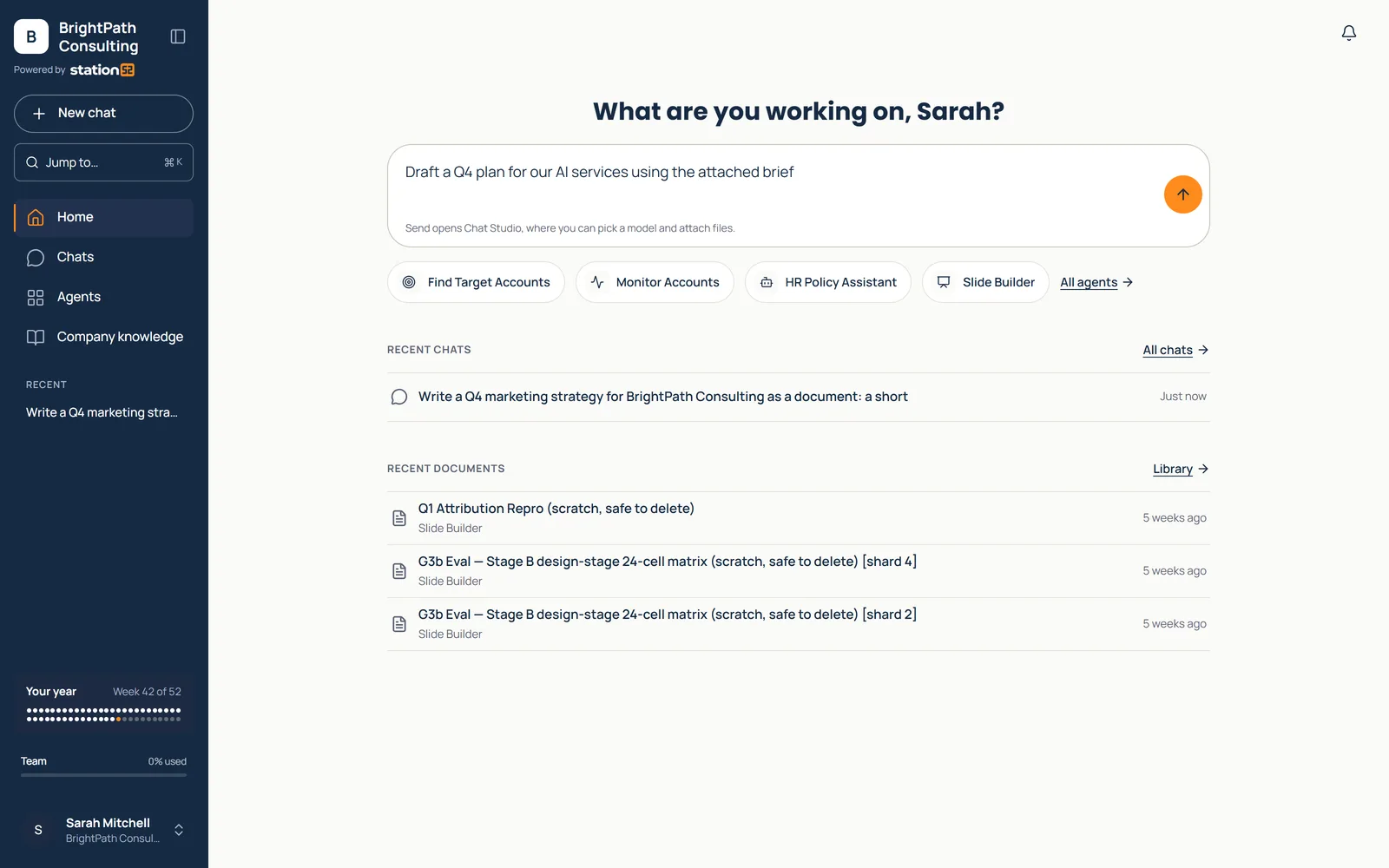
One home screen for every client team, with their agents and recent work.
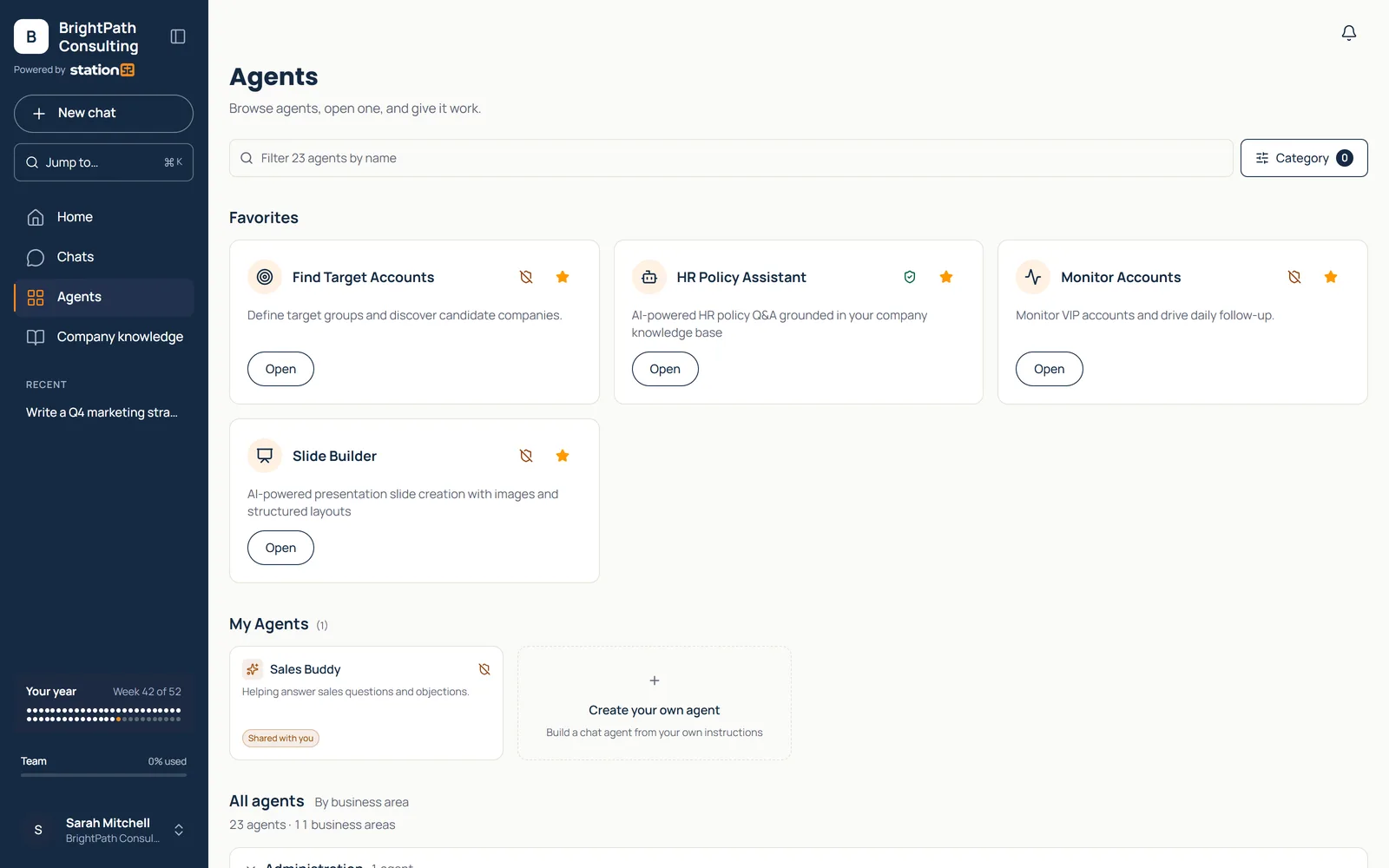
Business agents ready to use, with favorites first and every agent by business area.
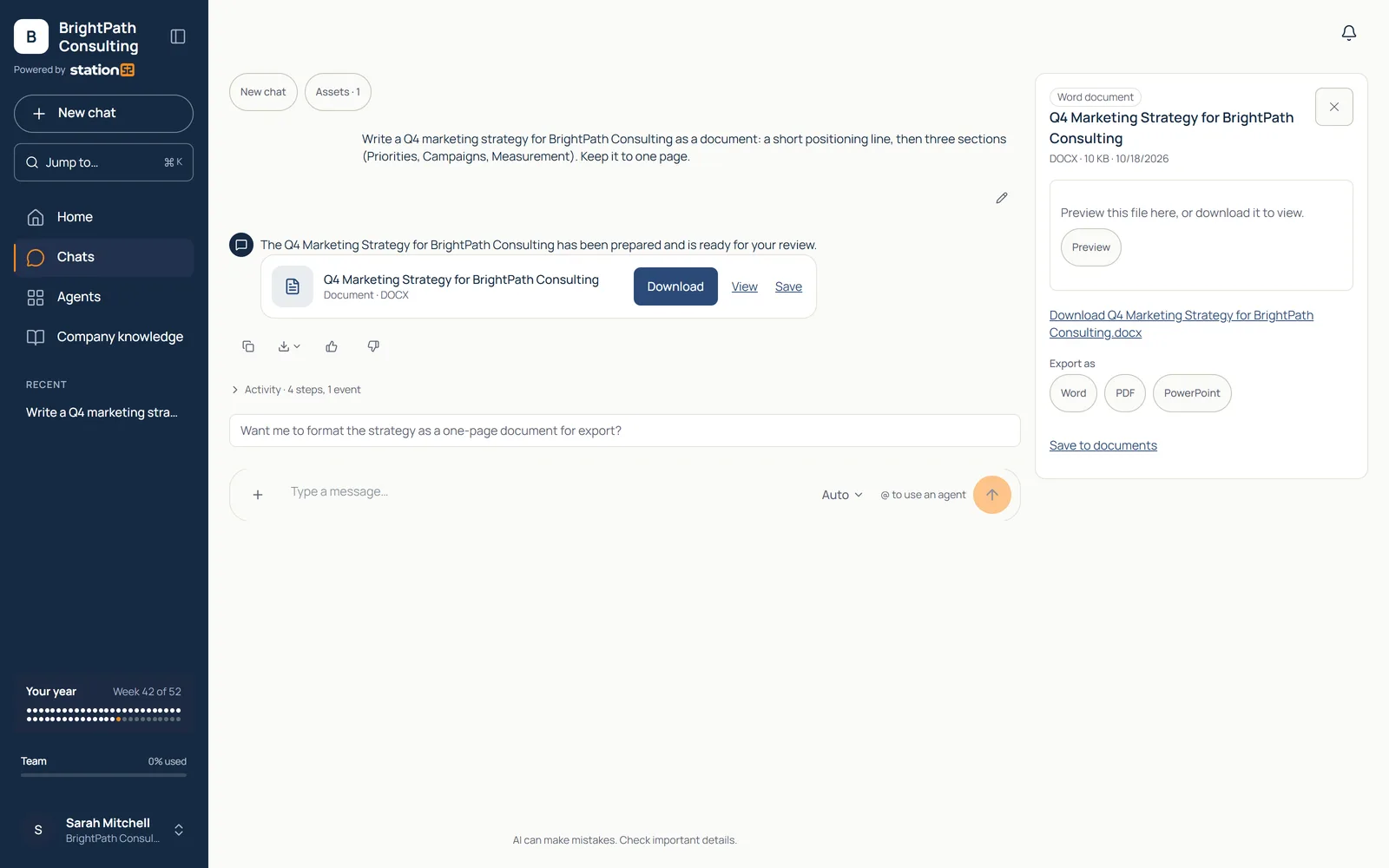
Chat through to the deliverable: a finished Word document with PDF and PowerPoint export.
Product screens from a demo workspace; MSP and client names are fictional.
Security and controls
A shared security foundation across chat, documents, memory, and agents — with identity and audit controls for business deployment.
Detected personal data is replaced with tokens before prompts reach a model and restored only in the authorized user’s response. If PII protection fails, the request is blocked, logged, and alerted.
Personal data stays out of the model, in prompts, files, and memory.
Sixteen PII types are enforced, including tax identifiers, IBANs, cards, and email; documents also cover phone and date of birth. Card data is masked; expiry and CVV are stripped. Financial figures in tables are preserved. Uploaded files are protected in full before AI indexing. Chat history and personal memory are tokenized before storage; shared memory is designed to prevent cross-user PII exposure.
Original values stay encrypted and are restored only for defined purposes.
Original values use AES-256-GCM encryption with tenant-scoped hashes: the same email produces different tokens in different companies. Vault access is server-only; restoration is limited to four defined code purposes. There is no admin decrypt screen. Integration credentials also use AES-256-GCM, with versioned keys.
Your company’s data stays separate from every other company’s.
Postgres row-level security separates tenants. Live canaries alert on account mismatches. Server-side checks validate sessions, plans, entitlements, and roles on agent and admin routes. Database triggers guard billing, credit, and privacy/audit fields against direct API changes. More than 100 security tests run on every change; regression checks cover gateway routing, tenancy, and vault access controls.
Use the sign-in your company already has, and decide who gets what.
Per-tenant SAML and OIDC support Entra ID, Okta, Duo, Google Workspace, and generic SAML. Enforce SSO and route sign-in by email domain. Directory sync provisions users through Google Workspace or Microsoft Graph; Google uses read-only scopes and daily sync. Admins can restrict models, assign roles and groups, and manage agent access. Included credits cap usage; extra usage requires admin opt-in.
A record of every AI call and sensitive change, ready when someone asks.
Tenant-isolated, tamper-resistant admin logs record sensitive changes with configurable retention. Every AI call, including failed and canceled calls, records whether PII protection applied. Model fallbacks are logged across six provider adapters. OpenAI response storage is turned off; provider error details stay out of the browser. The Security Audit add-on provides a proof-of-protection dashboard with export.
Connect your own systems without stepping outside the protections.
API keys are shown once, stored as hashes, individually rate-limited, and immediately revocable. Allowlisted API routes use the same database security as normal users. A typed Agent SDK and test harness provide the integration contract; agents built on it inherit the gateway, vault, and tenant isolation. Agents that bypass the vault are labeled in the interface and require an acknowledged disclosure.
Classroom and Workshop
Classroom provides training. Workshop helps clients build AI programs, workflows, and measurement plans. Both are separate services. Workspace reports agent usage. AI Opportunity records client-supplied value estimates and realized results; each client defines its outcome measures.
Build your AI consulting practice
Three specialized agents do the analysis and produce the deliverables, so your team spends more time advising clients and less time writing reports.
01 · Assess
Sell a fixed-fee assessment.
Invite leadership and staff by group link to a resumable survey of about 40 questions. Score eight dimensions spanning strategy, data, technology, processes, people, skills, responsible AI, and use cases. Each participant receives a sponsor-branded web report and PDF with a verdict, three priorities, a 30-60-90 day plan, benchmarks, and charts.
The follow-on: Use the gaps to scope your next proposal.
02 · Govern
Sell governance setup plus annual review.
Draft from 24 templates, including 10 AI policies, with four questions per policy. Keep revisions and uploaded existing policies in one versioned library. Share with external reviewers, export to Word, and publish approved policies to Company Knowledge so agents use the client’s rules as guidance.
The follow-on: Turn Responsible AI gaps into policy work and recurring reviews.
03 · Identify and manage
Sell a monthly or quarterly advisory retainer.
Extract ideas from meeting transcripts or add them manually. Rank on seven weighted dimensions: value, effort, readiness, alignment, risk, system change, and confidence. Manage seven delivery stages with activity history. Record estimated annual value, hours saved, cost, and actual value delivered. Export QBR reports to PDF, CSV, or email.
The follow-on: Review delivered value and agree on the next priorities at each QBR.
One practice. One platform. Readiness opens the engagement. Policy work establishes governance. Opportunity management sustains the program. All use the same platform protections and audit foundation.
Questions
Station52 bills clients by credit-card subscription. Your team owns the client relationship and provides first-line support, and Station52 handles escalations through you.
Workspace with company access controls and a monthly credit allowance. Invited employees start as standard users, admins manage models and agent access by group, and usage pauses at the included limit unless an admin opts into extra usage.
No. Company prompts, documents, conversations, and dashboards remain private. Admins manage accounts without access to the company’s work.
Your brand appears in the Workspace sidebar beside the client’s, so clients see your team in the work they do every day. The Station52 attribution stays in place.
Classroom provides training. Workshop helps clients build AI programs, workflows, and measurement plans. Both are separate services.
Email hello@station52.ai with a short note about your client base. We will set up a working session to walk through the program and how delivery is shared.
Partner program
Offer Workspace as a member benefit, with Station52 delivering the platform and member support.
See the membership programProduct
Chat, business agents, company knowledge, and shared platform controls in one place.
See WorkspacePlans
Plans, included credits, and how extra usage works.
See pricingMSP program
Tell us about your client base. We will walk through the program, the delivery responsibilities, and the consulting agents with your team.